
My Tracker isn't connecting. What should I do?Updated 2 hours ago
If you’re having issues connecting your Orbitkey Tracker, follow the steps below for the tracking network you’re using.
Google Find Hub
If you’re using an Android phone:
- Make sure Bluetooth and Location are turned on on your phone.
- Check that Google Find Hub has permission to connect to nearby devices:
Settings → Apps → Find Hub → Permissions → Nearby devices → Allow - The wording may vary slightly depending on your phone.
- Go to Settings → Google → All services → Devices and make sure Scan for nearby devices is switched on.
- Restart your phone, then try setting up your Tracker again.
- If your Tracker was previously paired with Google Find Hub before the issue started and is still listed there, remove it from Find Hub before performing a factory reset and setting it up again.
Apple Find My
If you’re using an iPhone:
- Make sure Bluetooth is turned on.
- Make sure your iPhone is running the latest available version of iOS.
- Restart your iPhone, then put your Tracker into pairing mode and try setting it up again through:
Find My → Items → + → Add Other Item - If your Tracker was previously paired with Apple Find My before the issue started and is still listed there, remove it from Find My before performing a factory reset and setting it up again.
If it still won’t connect, follow the factory reset instructions below before trying the setup again.
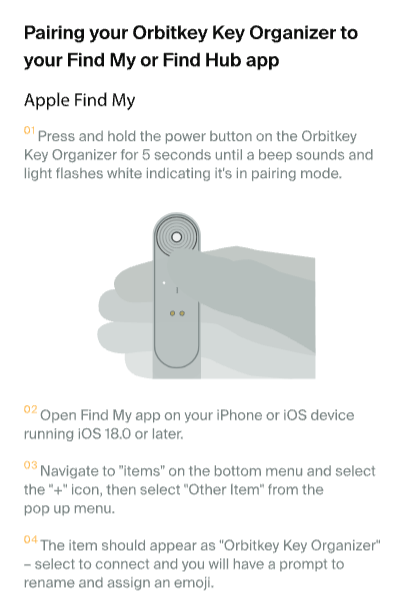
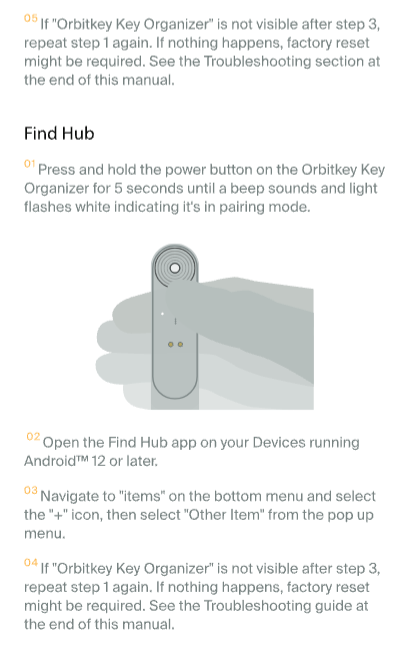
How to pair your Tracker
Follow the setup instructions below to pair your Tracker with Apple Find My or Google Find Hub.
How to factory reset your Tracker
If your Tracker still isn’t connecting after trying the steps above, perform a factory reset and try setting it up again.
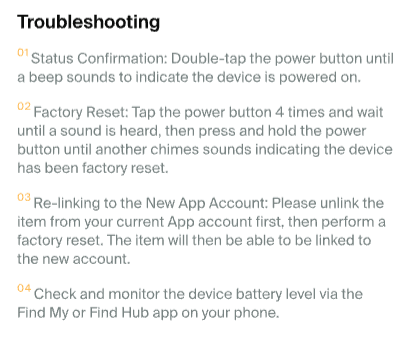
Please note that unpairing and factory resetting are different processes. If you’re resetting your Tracker, make sure you follow the factory reset instructions above rather than the unpairing steps.
How to unpair your Tracker
You may also find the following videos helpful if you need to remove your Tracker from your tracking network:
Still having trouble?
If your Tracker still won’t connect after trying these steps, please contact our team and include:
- Your phone make and model
- Your operating system (OS) version
- A screenshot or screen recording of any error message you’re seeing
This will help us look into the issue further and recommend next steps.